How to Upload Files on FastUpload.cloud (Step-by-Step Guide 2026)
Mar 17, 2026 11:32 AM
Sudip Acharya
How to Upload Files on FastUpload.cloud, Uploading files online should be fast, simple, and secure. With FastUpload.cloud, you can upload files without creating an account and instantly share them with others.
In this guide, you will learn how to upload files on FastUpload.cloud, choose storage duration, and generate shareable links.
.Why Use FastUpload.cloud for File Uploads?
FastUpload.cloud is designed for users who want a quick and reliable way to share files online.
Key Benefits:
-
No registration required
-
Fast file upload
-
Custom file storage duration
-
Instant download and share links
-
Supports multiple file formats
Whether you are sharing documents, videos, or images, FastUpload.cloud makes the process simple.
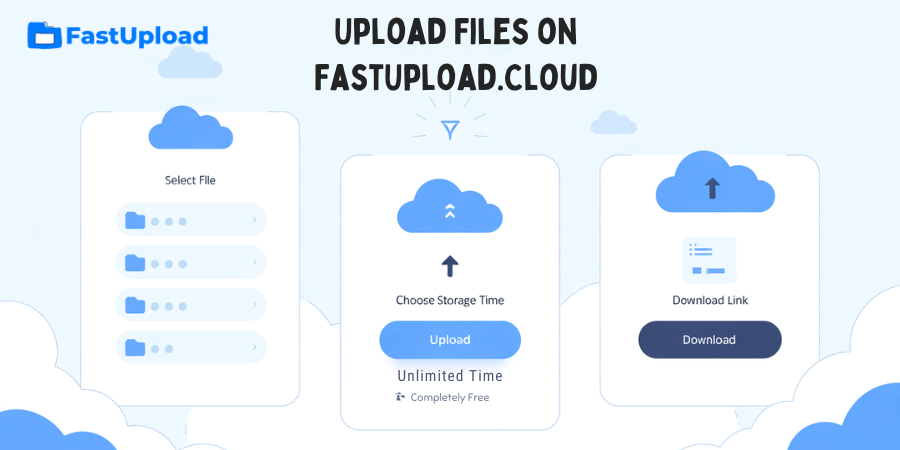
Step-by-Step: How to Upload Files on FastUpload.cloud
Follow these easy steps to upload your file:
Step 1: Go to the Upload Page
Visit the FastUpload.cloud Upload Page (internal link: /upload)
This is where you can start the upload process.
Step 2: Select Your File
Click on the upload button and choose the file you want to upload from your device.
You can upload different types of files such as:
-
Documents
-
Images
-
Videos
-
Compressed files
Step 3: Choose File Storage Duration
One unique feature of FastUpload.cloud is that you can choose how long your file will be stored.
You can select storage time from:
-
5 minutes
-
Short-term options
-
Long-term storage
-
Unlimited time
This gives you full control over your file availability.
Step 4: Click Upload
After selecting your file and storage duration, click the Upload button.
The system will start uploading your file to secure cloud storage.
Step 5: Get Your Download and Share Links
Once the upload is complete, you will receive:
-
A download link to access the file
-
A share link to send to others
You can now easily share your file with anyone.
How to Share Uploaded Files
After uploading your file, simply copy the share link and send it via:
-
Email
-
Messaging apps
-
Social media
-
Websites
Anyone with the link can download the file بسهولة.
Tips for Better Upload Experience
To get the best results when uploading files:
Use a Stable Internet Connection
Ensures faster and uninterrupted uploads.
Compress Large Files
Reduce file size before uploading for better speed.
👉 Learn more:
How to Compress Files Before Uploading.
Choose the Right Storage Time
Select a duration based on your needs to manage storage efficiently.
Is FastUpload.cloud Safe?
Yes, FastUpload.cloud is designed with security in mind.
-
Files are stored securely
-
Upload process is protected
-
Users control file sharing
However, always avoid uploading sensitive personal data publicly.
Common Mistakes to Avoid
Avoid these mistakes when uploading files:
-
Closing the browser during upload
-
Selecting wrong storage duration
-
Uploading unsupported file formats
-
Sharing links publicly without control
Who Should Use FastUpload.cloud?
FastUpload.cloud is perfect for:
-
Students sharing assignments
-
Developers sharing files
-
Content creators uploading media
-
Businesses sending documents
Related Guides
To improve your file sharing experience, check out:
Conclusion
Uploading files on FastUpload.cloud is simple, fast, and flexible. With features like custom storage duration and instant share links, it provides a complete solution for file sharing.
If you are looking for a reliable way to upload files online, control storage time, and share files بسهولة, FastUpload.cloud is the perfect choice.
Start uploading your files today and experience fast and secure cloud storage.
Login or create account to leave comments
Popular articles
Best Free File Sharing Websites in 2026 (Top Secure Platform...
Mar 17, 2026 11:18 AM
How to Upload Files on FastUpload.cloud (Step-by-Step Guide...
Mar 17, 2026 11:32 AM
How to Compress Files Before Uploading (Complete Guide 2026)
Mar 17, 2026 11:25 AM
How to Add Password Protection to a File in 2026
Jun 20, 2026 01:13 PM
How to Send Large Files Online for Free in 2026
Mar 17, 2026 10:59 AM
Categories
Comments (0)